Neon Injector APK Download Free For Android Latest Version 2026
NOW
14MB
V1.13
Android 13.0
999
Description
Neon Injector APK is designed for Android users who want to explore new visual styles in compatible mobile games. It offers a collection of skin options that may help change the look of selected in-game items and give the gaming interface a different appearance. The app focuses on keeping navigation simple so users can browse the available choices without spending too much time learning how everything works. For players who enjoy experimenting with game visuals it can be an interesting option to explore.
Another feature worth considering is its lightweight approach which may suit users who have limited storage space on their phones. The available designs and tools can differ depending on the installed Android device version and supported game. Keep in mind that advertised features may not always work as expected and some skins may be unavailable or incompatible. Before downloading Neon Injector APK review the file source check its permissions and consider the possible risks to your device and game account. Using official customisation options remains the safer choice when account protection is a priorit
Why Is Neon Injector APK Worth Exploring?
Neon Injector APK may attract Mobile Legends fans who enjoy trying different visual styles for their favourite heroes. It focuses on skin customisation and gives users a way to explore different appearances for supported game characters. The simple layout can help new users browse the available options without dealing with confusing menus. For players who enjoy refreshing the look of their game this tool may offer something new to explore.
Before trying Neon Injector APK users should check whether the available features work with their game and Android device. Results may vary depending on the app version and compatibility. Some skin options might not display correctly or work as expected. It is also important to review the download source and requested permissions because unofficial modification tools can create security concerns or put a gaming account at risk. Official in-game customisation features are a safer choice for players who want to protect their accounts.
Key Features of Neon Injector APK
Custom Skin Options
The application focuses on visual skin customisation for supported game characters. Players may find different appearances and styles to explore. Actual skin availability depends on the installed version and compatibility with the target game.
Lightweight Application Design
A compact application can be useful for Android users who want to save storage space. Neon Injector is described as lightweight although its actual size and resource usage should be checked against the specific APK file before installation.
Simple User Interface
An easy to navigate interface can help users locate available features without unnecessary confusion. Beginners should still review each option carefully and avoid granting permissions that do not appear necessary for the app’s intended purpose.
Android Device Support
Compatibility is an important factor when choosing an Android utility. Support may depend on the Android operating system device settings required permissions and the version of the target game. Check these details before installing the Neon Injector.
Skin Collection Updates
Some releases may offer changes to their available skin options over time. However update frequency is not guaranteed. Always verify the version information and download source before installing an updated APK.
Game Compatibility Checks
Not every visual customisation tool works with every game version. Updates to a game can cause older tools to stop working or produce unexpected results. Check compatibility information and avoid using modifications that violate the game’s rules.
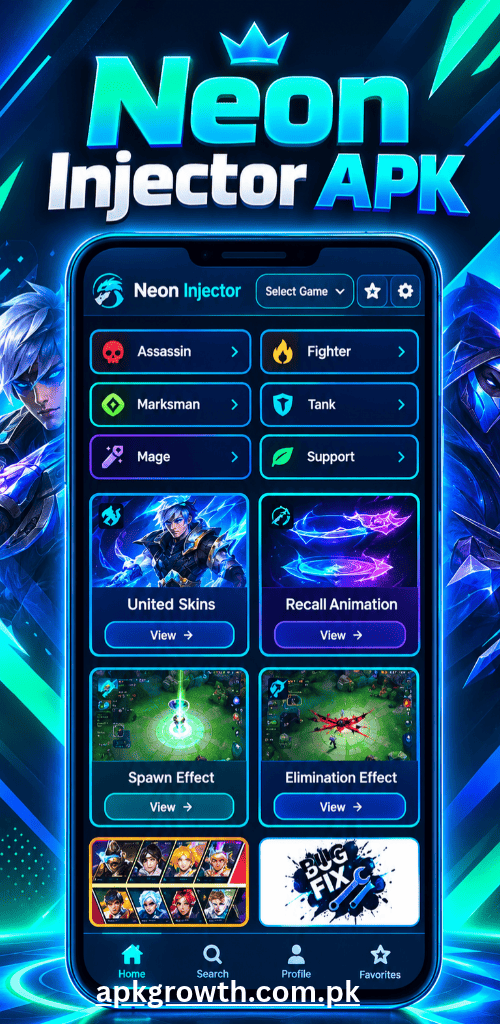
Neon Injector APK Download and Setup Guide:
Steps to Get Neon Injector APK
- Search for App Information: Find a download page that explains the application’s purpose and available features.
- Verify the Version: Check the version number and release information to understand which edition is being offered.
- Check Device Requirements: Make sure your Android phone meets the stated system requirements.
- Inspect the File: Use a reliable security scanner to check the downloaded APK whenever possible.
- Save the Installer: Download the file only after confirming that the source appears trustworthy.
- Review Access Requirements: Check which device features the application wants to access before continuing.
Installing a Neon Injector on an Android Phone:
- Open the file manager on your Android phone.
- Navigate to the folder where the downloaded APK is stored.
- Select the file and read the installation information displayed on the screen.
- If your phone blocks the installation review the security warning instead of bypassing it automatically.
- Check the application’s requested permissions and decide whether they match its purpose.
- Complete the setup only if you are confident about the file’s source and safety.
Neon Injector and Mobile Legends Skin Customisation:
Explore Different Visual Styles
Neon Injector is associated with game skin customisation. Players who enjoy changing the appearance of their favourite heroes may be interested in learning about the visual options it claims to provide.
Will Custom Skins Appear During Matches?
The result can vary. A skin displayed on one device may not appear to other players and some visual changes may stop working after a game update. There is no guarantee that every listed skin will load correctly or remain available.
Players should also understand the difference between changing a character’s appearance and changing gameplay mechanics. Cosmetic options do not automatically improve aiming movement damage or other competitive abilities.
Can You Unlock Every Premium Skin?
Do not assume that an injector can unlock every paid or limited edition skin. Claims about unlimited premium items should be checked carefully. Official game stores and in game events are more dependable ways to discover available skins rewards and promotional offers.
Does Neon Injector APK Work Without Root?
Neon Injector APK may work on some Android devices without root access but the exact requirements depend on the app version and its available features. Root access allows deeper changes to Android system settings while many regular apps can run with standard permissions. Before installing Neon Injector APK check the version details and confirm whether it supports your device without requiring extra system changes.
Rooting your phone only to try game skins is usually not worth the added risk. It can reduce device security affect some apps and create problems with future updates. Always review the permissions requested by Neon Injector APK and avoid granting access that does not match its purpose. If root access is required understand the possible consequences before making changes to your phone.
Advantages and Disadvantages
| Advantages | Disadvantages |
|---|---|
| 1. Focuses on game appearance customisation. | 1. Some advertised skins may not function properly. |
| 2. May offer a straightforward way to explore visual options. | 2. Compatibility may change after game updates. |
| 3. A compact installer may require less storage space. | 3. The actual file size and resource usage need verification. |
| 4. May appeal to players who enjoy different character designs. | 4. Certain features may require additional permissions. |
| 5. Can provide an option to investigate cosmetic tools. | 5. Unverified downloads can expose devices to security threats. |
| 6. Gives users another topic to explore when researching skin tools. | 6. Feature availability and update support may be unclear. |
Important Things to Check Before Installing Neon Injector APK
Before downloading Neon Injector APK take time to understand what the app offers and whether it suits your Android device. Skin options and other customisation tools may vary between versions so avoid relying on claims that have not been verified. Checking compatibility first can help you avoid installation problems and disappointing results.
Choose a download source carefully and review the permissions requested during installation. Never provide unnecessary access to personal data or device functions. If you want to change hero appearances in Mobile Legends explore the game’s official skin options before trying external tools. This approach helps you make an informed choice while reducing potential security concerns and protecting your gaming account.
User Feedback Examples:
Ali Raza Skin Options
I am interested in trying different hero appearances. I would first check which features are available and whether they work with my game version.
Hamza Khan Installation
I prefer applications with clear installation instructions. Details about the file size Android requirements and permissions would help me make a better decision.
Usman Ahmed Compatibility
Game updates can affect how customisation tools work. I would check compatibility information before expecting a particular skin to appear.
Bilal Hussain’s Overall Experience
Visual customisation can make gaming more enjoyable but I would prioritise account safety and choose official skins if an unfamiliar tool seemed unreliable.
Frequently Asked Questions
1. What is Neon Injector APK?
Neon Injector APK is described as an Android utility that provides access to visual skin customisation options for supported games. Its available features depend on the specific version and game compatibility.
2. Is Neon Injector APK safe to use?
Its safety cannot be guaranteed without checking the specific APK file. Downloading from unknown websites may expose your device to malware or privacy risks. Always verify the source and review app permissions before installation.
3. Does Neon Injector APK support Mobile Legends?
Neon Injector APK is associated with skin customisation but support for Mobile Legends depends on the particular release. Check reliable compatibility information before installing or using any third party modification tool.
4. Does Neon Injector APK work on all Android devices?
No universal compatibility can be guaranteed. Performance may depend on your Android version device specifications app release and target game updates. Check the requirements before downloading the APK.
Final Verdict
Neon Injector APK may appeal to Android users who want to explore different skin designs and give supported games a fresh appearance. Its usefulness depends on the features included in the version you choose and whether they work properly on your device. Not every advertised option is guaranteed to function as expected so it is important to keep your expectations realistic.
Before installing the app check the APK source understand the requested permissions and consider the possible effects on your device and gaming account. Players who prefer a more reliable experience should start with the customisation features available inside the official game. Making a careful decision can help you enjoy your favourite games while keeping security and account protection in mind.