BR Mod Injector APK Exciting Options and Potential Problems 2026
now
14 MB
v1.8
5.0+
100+
Description
BR Mod Injector is gaining attention among Free Fire fans who want to discover new customisation possibilities. This tool offers an alternative way to explore different visual settings and gameplay options beyond the standard game experience. Its features may vary between versions so users should check the available details before deciding whether it matches their phone and personal preferences.
Many players enjoy testing new ways to customise their gaming experience. BR Mod Injector may attract these users with its range of options and different setup possibilities. However the actual performance can depend on the app version and device compatibility. Reading the available information first can help users understand what to expect before trying the tool.
Before using BR Mod Injector players should also consider their privacy and account security. It is important to review app permissions and avoid sharing passwords or sensitive login details with unknown services. Unofficial tools may also create game compatibility issues or lead to account penalties. Understanding these concerns and considering the official game settings can help players make a more informed decision.
What Is BR Mod Injector APK?
BR Mod Injector is a gaming utility that attracts Free Fire players interested in exploring different customisation options. Depending on the version available users may come across various visual adjustments and gameplay settings. The features and overall experience can differ based on the Android version and phone specifications. Checking the app details before use can help players understand its available functions and limitations.
Before trying the BR Mod Injector users should consider device performance and account protection. Some features may not work properly on every phone and unexpected behaviour can affect the gaming experience. Players should review app permissions carefully and keep their personal login details private. It is also important to follow the official game rules because unauthorised modifications may lead to account restrictions.
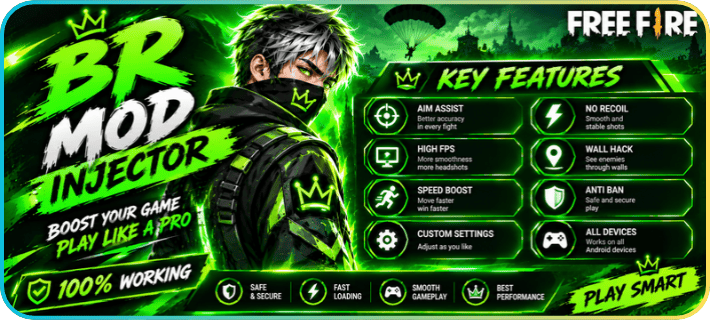
BR Mod Injector Features and Main Highlights
Different Gameplay Settings
Some versions may provide extra settings that change how certain parts of the game are arranged or presented. These options can give players more control over their preferred setup.
Easy to Understand Interface
A simple interface can make a gaming utility easier to explore. Users can check the available sections and understand the settings before making any changes.
Game Customisation Options
Customisation is one reason players may search for BR Mod Injector. Depending on the release users may find different visual or configuration choices for their gaming environment.
Small and Simple Setup
Some releases are designed with a straightforward structure. A lighter setup may be easier to manage on devices with limited storage or resources.
Fast Feature Access
Quick access can make it easier to reach available settings. Users can review the main options without spending too much time searching through different menus.
Features May Change With Updates
BR Mod Injector features are not always the same. New versions can introduce changes while older releases may have a different selection of options.
Android Device Support
Android compatibility can depend on the operating system and phone specifications. Users should check the basic requirements before installing any version.
Adjustable User Experience
Different players have different preferences. A flexible setup can help users explore available options and choose settings that suit their device and gaming style.
Key Details to Check Before Trying BR Mod Injector
Before exploring BR Mod Injector users should first learn about its available features and basic requirements. Checking the version details and Android compatibility can help them understand whether the application is suitable for their device.
Each release may offer a different set of options and performance levels. Some functions may work differently depending on the phone model and Android version. Users should check the available information instead of assuming that every version works in the same way.
Privacy is another important factor to consider. Avoid sharing passwords banking information or personal details with unfamiliar applications. Reviewing permissions and understanding potential account risks can help users make safer decisions while exploring their gaming options.
How Can BR Mod Injector Affect Gameplay?
The overall experience can depend on the version of the injector and the device being used. Some users may notice different settings while others may see only limited changes.
Phone performance also matters. RAM storage processor speed and Android version can influence how smoothly an application operates.
For a better experience users should close unnecessary apps and keep enough free storage on their phone. Keeping the Android system updated can also help with general device stability.
Android Compatibility and Basic Requirements:
BR Mod Injector is mainly searched for on Android devices. However compatibility is not guaranteed for every phone.
Before installing a version users should check:
- Android version
- Available storage
- RAM capacity
- Device performance
- Application permissions
- Version requirements
Older phones may have difficulty running some newer applications. On the other hand a newer device may handle the same utility more smoothly.
Privacy Settings and App Permissions:
Checking app permissions is an important step before installing BR Mod Injector. Users should review each request and understand why the application needs that access. This can help them identify permissions that seem unnecessary for the advertised features.
If an app asks for access to sensitive data without a clear reason users should avoid granting permission until they understand the purpose. They should also keep their passwords and personal information private. Protecting login details and reviewing privacy settings can help create a safer gaming experience.
Why BR Mod Injector Features May Vary by Version?
BR Mod Injector may offer different features depending on the release. Updates can change the menu layout and available settings. Some older options may disappear while new adjustments become available in later versions. These changes can affect how users explore the application.
Checking the version details before installation can help users understand what to expect. Features shown in older screenshots or guides may not match the current release. Device compatibility and Android system requirements can also affect performance. Reviewing the available information helps users avoid confusion and make informed decisions.
Safety Points for Android Users
Safety should remain a priority when exploring the BR Mod Injector. Users should obtain applications from sources they trust and check the file information before installation.
It is also useful to scan downloaded files with reliable security software. Users should stop the installation if the file behaves unexpectedly or requests unusual access. Keeping the original game and important account details protected can reduce unnecessary problems.
Protect Your Free Fire Account
Players should remember that not every gaming tool is permitted under the official game policies. Using unsupported features may create problems with normal gameplay or account access.
Before trying BR Mod Injector users should review the latest Free Fire rules and understand the possible consequences. Following the official guidelines and using the game’s built-in customisation settings can help players reduce unnecessary risks and protect their accounts.
Tips for Better Device Performance
A few simple steps can improve general Android performance:
- Keep enough free storage available
- Close unused background applications
- Restart the phone when performance drops
- Keep Android updated
- Avoid installing unknown files
- Review app permissions regularly
- Use a stable internet connection
Use BR Mod Injector With Awareness:
- BR Mod Injector should be approached as a gaming utility rather than a guaranteed way to improve every player’s results.
- Features may work differently across devices and releases. Users should therefore test settings carefully and avoid making unnecessary changes.
- Responsible use also means protecting personal information and respecting the rules of the game.
Why Are Players Interested in BR Mod Injector?
BR Mod Injector can attract users who enjoy testing alternative configurations around their Free Fire experience. The interest can also come from the variety of versions available online.
However popularity does not mean that every version is reliable. Users should still check compatibility safety information and permissions before making a choice.
What Makes BR Mod Injector Stand Out?
BR Mod Injector may offer a different experience depending on its interface and available customisation options. Some versions may feature a straightforward menu while others may include different settings and layout changes.
The overall experience can also depend on the Android device and the selected configuration. Users should check the features available in their chosen version and avoid assuming that every option will work identically across different phones.
Benefits and Possible Limitations
| Benefits | Limitations |
|---|---|
| May provide extra configuration choices | Features can vary by version. |
| Simple interface in some releases | Compatibility may differ. |
| Can offer customisation options | Performance depends on the device. |
| Easy access to available settings | Some permissions may require attention. |
| Useful for users who like testing settings | Game rules should always be considered. |
FAQs About BR Mod Injector
What is the BR Mod Injector?
BR Mod Injector is a gaming utility associated with Free Fire. It may provide different configuration or customisation options depending on the version.
Does BR Mod Injector work on every Android phone?
No guarantee can be given for every device. Compatibility can depend on the Android version hardware and the specific release.
Can BR Mod Injector features change?
Yes. Different versions can contain different settings menus and functions.
Is it important to check permissions?
Yes. Users should review requested permissions and avoid giving access that does not appear necessary.
Can using an injector affect a game account?
There can be account related concerns when a tool changes or interacts with the normal game environment. Players should always consider the current game rules before use.
Final Verdict on BR Mod Injector APK
BR Mod Injector may appeal to Free Fire players who want to learn about alternative customisation options and explore different gaming settings. However the available features and overall performance can vary depending on the version and Android device.
Before installing the application users should check device compatibility review permissions and protect their personal information. They should also understand the official game rules and possible account risks. Making informed choices can help players enjoy Free Fire while keeping their device security and account protection in mind.